This week brought another new challenge, and despite my initial trepidation, I started a Wiki -- you can take a look at it here. Since I often work with students who need ideas and strategies to help them have a successful school year, this is what I decided to focus on as my "test drive." My primary concern was about security, but once I discovered that I could modify the security settings, I felt much happier. At the moment, I have locked some pages so they cannot be changed (so my students don't add interesting information to my biography!) and the entire site is open by invitation for editing, although anyone can view it.
I do find that the wikispaces formatting is a bit awkward at times. If you want to go back and change the size of the lettering, for instance, you are right back at square one -- and you must also change the font and color from the default. Trying to center things is also occasionally awkward, but I'm sure I'll figure it out. I have been able to add pictures and make links to new pages and external sources quite easily. I even added a widget! The result is fairly professional looking, if simple.
This week, if all goes well, I will have some of my students take a Learning Style Quiz and post some of their results on the wiki. I'll keep you posted!
Sunday, October 17, 2010

Wednesday, October 13, 2010
Trying to add a video
Let's see if this works. I'd like to be able to add videos to the classroom blog...
School House Rock -- Adjectives
School House Rock -- Adjectives
Progress
Despite being sick as a dog for over a week, I've made some progress: I added a bunch of new sites to my PortaPortal, which the kids in my classroom use on a regular basis. I also discovered how to change the settings to "click and drag" so I could reorganize the contents of my folders, with the newest links on top. The kids are currently learning their Spanish numbers, Canadian provinces and capitals, and latitude/longitude. Studying through these games is fun for them, and they love to compete and compare scores. If my portaportal gets much bigger I may re-think its organization, but for now, we are all enjoying it!
I have started designing a googlesite, based on my thoughts from last week. I talked with my head teacher about it, and we also discussed the difference between a site and a blog. Since our class is a small resource room for kids with academic needs, we want to be sure any site is very easily accessed and navigated. I'm starting small and trying to keep it well organized, cheerful and easy to read. We think we will use this as a way to keep in touch with parents instead of through the parent portal "newsletter" function, which seems a bit "clunky" compared to these two applications.
I have yet to use googledocs with students except to send the 8th graders a format for earthweek and a brief note, which they then saved on their desktops. Some of my students get confused by technology and need time to practice before using it for important tasks, so I am thinking of ways to do that in the coming weeks, with study guides, etc. The 7th graders do not yet have gmail accounts, and I want to check with SK to see how to go about setting them up (do we do it as a class, get parent permissons, and give you their passwords?) I know that once gmail and docs get going they will be very useful. For example, in the 7th grade, three times (that I know of) students who had the bulk of their South Portland History Project on their computers were out of class, and their teammates were struggling to work without their scripts. If it had been on googledocs, we would have all had access. This project is already so massive, though, I can understand why we didn't attempt to add another layer of complexity at this time!
Now I'm learning about wiki's, which, from what I can tell, are almost like a "group" website. I particularly liked the Discover Utopia Project, which I think might interest the 8th grade LA teachers when they teach "The Giver" later in the year. Their Code of Conduct for blogging was very well thought out.
I must say, I truly appreciate the opportunity to learn all these new applications, and it is very exciting to think of ways to use them with my students. Even though my 6th graders don't have laptops, I plan to get them on either our teacher computers or into the computer lab frequently to have them practice skills, increase background knowledge for books we are reading, take assessments, improve keyboarding skills, read "Tumblebooks" and hopefully, start writing on our blog. The computer keeps them interested and engaged, and since fine motor skills are a challenge for many of them, I hope that typing their work will make it easier for them to share their ideas.
Have a great week! Maggie
I have started designing a googlesite, based on my thoughts from last week. I talked with my head teacher about it, and we also discussed the difference between a site and a blog. Since our class is a small resource room for kids with academic needs, we want to be sure any site is very easily accessed and navigated. I'm starting small and trying to keep it well organized, cheerful and easy to read. We think we will use this as a way to keep in touch with parents instead of through the parent portal "newsletter" function, which seems a bit "clunky" compared to these two applications.
I have yet to use googledocs with students except to send the 8th graders a format for earthweek and a brief note, which they then saved on their desktops. Some of my students get confused by technology and need time to practice before using it for important tasks, so I am thinking of ways to do that in the coming weeks, with study guides, etc. The 7th graders do not yet have gmail accounts, and I want to check with SK to see how to go about setting them up (do we do it as a class, get parent permissons, and give you their passwords?) I know that once gmail and docs get going they will be very useful. For example, in the 7th grade, three times (that I know of) students who had the bulk of their South Portland History Project on their computers were out of class, and their teammates were struggling to work without their scripts. If it had been on googledocs, we would have all had access. This project is already so massive, though, I can understand why we didn't attempt to add another layer of complexity at this time!
Now I'm learning about wiki's, which, from what I can tell, are almost like a "group" website. I particularly liked the Discover Utopia Project, which I think might interest the 8th grade LA teachers when they teach "The Giver" later in the year. Their Code of Conduct for blogging was very well thought out.
I must say, I truly appreciate the opportunity to learn all these new applications, and it is very exciting to think of ways to use them with my students. Even though my 6th graders don't have laptops, I plan to get them on either our teacher computers or into the computer lab frequently to have them practice skills, increase background knowledge for books we are reading, take assessments, improve keyboarding skills, read "Tumblebooks" and hopefully, start writing on our blog. The computer keeps them interested and engaged, and since fine motor skills are a challenge for many of them, I hope that typing their work will make it easier for them to share their ideas.
Have a great week! Maggie
Wednesday, October 6, 2010
Biting the Bullet
 | |
| photo from www.soxfirst.com |

General information about our Resource Room, our philosophy, etc.
Study Tips, links to flashcard makers, etc.
Study guides for particular classes (with the permission of the teacher)
Links to videos or sites that are directly connected to a particular mainstream unit, to help them understand the topic (multiple intelligences)
Helpful information for students (similar to some of the resources in their planner, or maybe a link to my Portaportal or delicious site?)
Calendar/Information about events (I have a student who asks me daily when flu-shots are!)
Newsletter -- what the kids have been up to, examples of work, "bragging!" This might be a link to blog? (My favorite blog is still Teacher Tom, and if you haven't checked it out, you will enjoy his enthusiasm and obvious love for his students!)
Links to Homework now (particular mainstream teachers that our kids work with this year, to make it easier for parents to find homework info)
Videos or pictures of student work
As you can see, my list keeps growing, so I expect completing my site will take a while. I have started it in google sites after watching all the videos I could. I'm currently trying to make it colorful, neatly organized, and very easily accessible for parents AND children.
Hope to link to it shortly. I've been sick for about 10 days now, so I'm a little behind schedule, and very thankful for an extra week!
Maggie
Monday, September 27, 2010
GoogleDocs
Well, this week has been illuminating. I have revisited Google Docs for the first time in 2 years, finding, to my delight, that the program is much easier to use, with many format/style options. I created a presentation (a sample slide show on the metric system, with text and photos imported from the internet). I like the fact that you can click and drag the slides to rearrange them, rather like keynote.
Then I made a document, and my daughter and I worked on a silly "Fortunately, Unfortunately" story, while chatting online. Lots of fun. One thing I didn't like, and I haven't figured out whether I can change this, is that I couldn't tell what changes she made without comparing the new version to the old version. For some reason I thought each contributor's comments/changes would be in a different color, but we couldn't make that work.
I imported a Word document as well, and that worked fine, I just tweaked the format a bit.
Then I created a short form/questionnaire, and discovered that the spreadsheet responses are a GREAT resource for teachers, committee chairs, etc. Incredibly handy and tidy way to collect and assess information.
The one thing I didn't remember was that all participants need a gmail account, and I don't know the gmail addresses of the other participants in the class, so that's a drag. But I can see that there is a lot of potential here! I can't wait to use these applications in my classroom.
Then I made a document, and my daughter and I worked on a silly "Fortunately, Unfortunately" story, while chatting online. Lots of fun. One thing I didn't like, and I haven't figured out whether I can change this, is that I couldn't tell what changes she made without comparing the new version to the old version. For some reason I thought each contributor's comments/changes would be in a different color, but we couldn't make that work.
I imported a Word document as well, and that worked fine, I just tweaked the format a bit.
Then I created a short form/questionnaire, and discovered that the spreadsheet responses are a GREAT resource for teachers, committee chairs, etc. Incredibly handy and tidy way to collect and assess information.
The one thing I didn't remember was that all participants need a gmail account, and I don't know the gmail addresses of the other participants in the class, so that's a drag. But I can see that there is a lot of potential here! I can't wait to use these applications in my classroom.
Monday, September 20, 2010
Delicious and PortaPortal
I am trying to give Delicious a fair shake, although I had started my PortaPortal page (user name MaggieMcNeice) and was having such a good time adding links for my students (as well as myself) that I found myself resisting a change to Delicious. But, I watched the videos, etc., and set up a Delicious page, and started collecting bookmarks. I like the fact that if you have the icon on the toolbar you get an automatic prompt to save a bookmarked site to Delicious. And I guess it's helpful to see how many people have bookmarked a site, although I tend to make my own decisions about a site instead on relying on others.
But I find the layout of the Delicious pages rather messy and uninteresting. I think it is complicated to navigate compared to Portaportal, at least for kids who have difficulty with say, more than 20 math problems on a page, or worksheets without lines to write on. Portaportal has those tidy little boxes, and the ability to put a happy little "wow" or smiley face next to your link. And it's pretty.
Sigh. Sometimes I am such a girl. (Years ago, we went to buy our first car -- I chose the color and my husband chose the engine type and all the boring stuff.)
I will continue to collect links on Delicious and see where it takes me, because I am learning that sometimes it takes a few weeks to truly understand the value of one of these sites. I'll keep you posted! (pun intended)
And now, for something delicious:
Maggie
But I find the layout of the Delicious pages rather messy and uninteresting. I think it is complicated to navigate compared to Portaportal, at least for kids who have difficulty with say, more than 20 math problems on a page, or worksheets without lines to write on. Portaportal has those tidy little boxes, and the ability to put a happy little "wow" or smiley face next to your link. And it's pretty.
Sigh. Sometimes I am such a girl. (Years ago, we went to buy our first car -- I chose the color and my husband chose the engine type and all the boring stuff.)
I will continue to collect links on Delicious and see where it takes me, because I am learning that sometimes it takes a few weeks to truly understand the value of one of these sites. I'll keep you posted! (pun intended)
And now, for something delicious:
 |
| An amazing Hot Fudge Sundae Cake from AllSweets.com (I may have to try this recipe!) |

Maggie
Sunday, September 19, 2010
Watch this video! It may change the way you think about Technology and Education!
 |
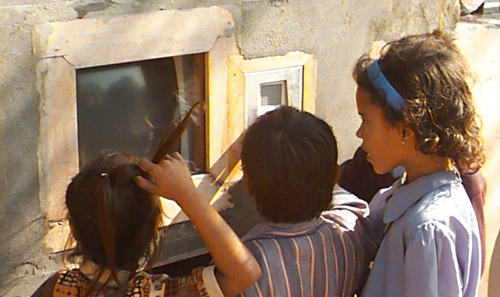
| Children in New Delhi learning at a computer in the Hole in the Wall project. |
Hi, everyone,
On my RSS feed today, I came across this video. Take a few minutes and watch it, and I think you will be quite interested! Sugata Mitra explains how his experimental "Hole in the Wall" process demonstrates that children are quite capable of learning on their own, even in empoverished and illiterate areas. His experiments show that by working in groups, with positive encouragement (he calls this the "Grandmother Cloud"), students learn even complex things, remarkably quickly and deeply.
I was watching my students last week as they struggled to learn the 50 states online. Two of the boys enjoyed the game, worked hard at it independently, and made some definite progress. One boy got very frustrated, put his head down several times, and needed my encouragement to continue. The other kept trying to interact with his neighbor, either to help him get an answer or solicit help himself. Since my goal was just to have them learn, not assess them, I encouraged them to give each other hints and support.
I wonder what would happen if I put them all on one computer? It would be interesting to see if they would all learn equally or whether some of them would "check out" and let a leader do the work? I may have to do an experiment and see!
One of the reasons I mention this is that we are discussing student group learning and Delicious. In a way, by having students share their bookmarks, we are encouraging them to share learning. But after watching this video, I wonder whether that is enough. I loved seeing the intensity and excitement on the students in the videos, and I want to see that on my students as well.
What do you think? Do we need more active ways to have students collaborate via skype, chat, etc. while researching? Should they work in a group on one or two computers, and be encouraged to discuss their research aloud instead of learning in an isolated setting? Active vs. passive learning...
It's worth thinking about!
Subscribe to:
Posts (Atom)